Coming to the App Store
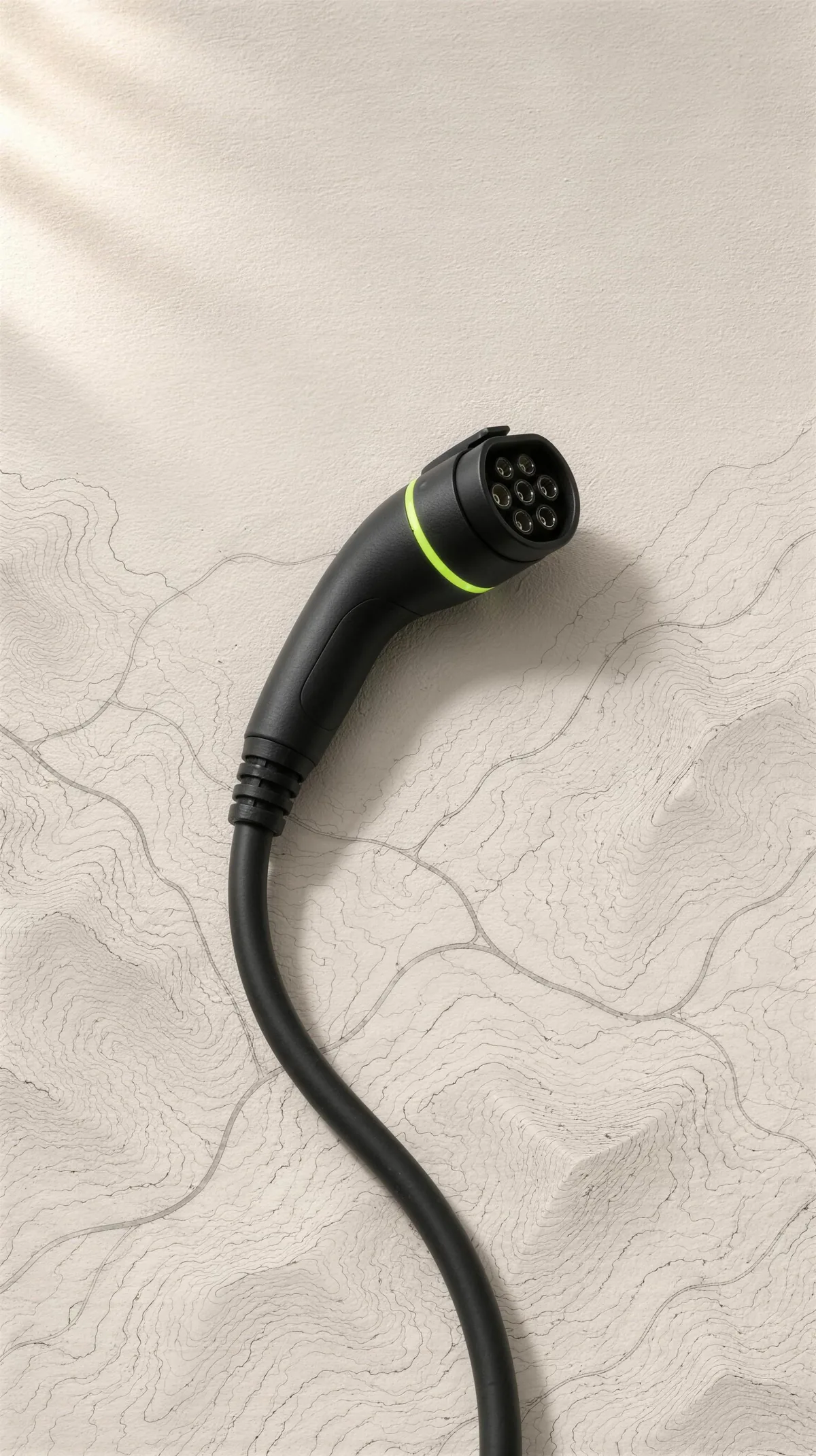
A black charging cable with a thin green ring lying on a paper road map

04 — LeTa Charge · iPhone

The right charger. Right now. And why.

LeTa Charge ranks Türkiye's registered stations by your direction, your car, published prices and the break you need — and writes down the reason for every pick.

Hold to decide Coming to the App Store

01 The decision

One card answers where to charge. Then it tells you why.

Ahead of you, compatible with your car, with the smallest detour. Pick a priority and the cards reorder; every recommendation keeps its reasons.

09:41

Where should I charge now?

Stations nearby

50%≈ 246 km range
  1. Best aheadStation A · Highway rest area≈ 1.5 km180 kW DC≈ 21 min2 sockets
  2. Best aheadStation B · Ring road≈ 4.2 km240 kW DC≈ 16 min2 sockets
  3. Best aheadStation D · Town centre≈ 2.6 km60 kW DC≈ 48 min2 sockets
  4. Best aheadStation C · Shopping centre≈ 0.7 km22 kW AC≈ 2 h 052 sockets

Press and hold · or Space / Enter

02 Map and search

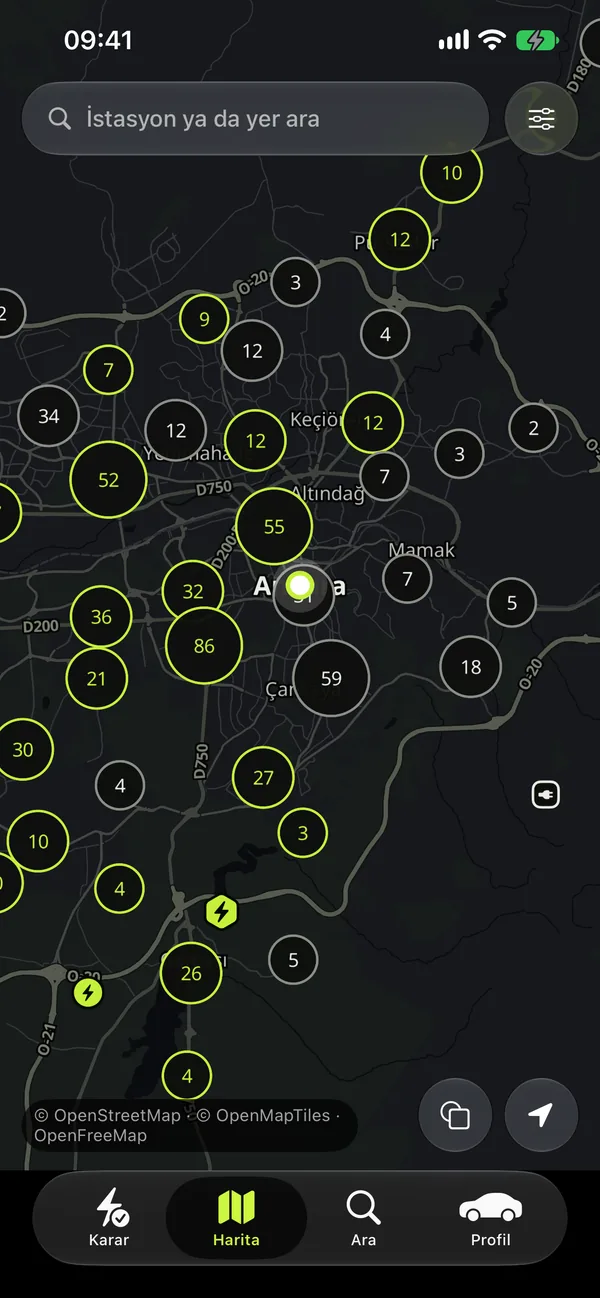
Every registered station in Türkiye, on one map.

Official records, clustered so the map stays smooth, with the published price on each pin. Search a station, a network, a province or an address; filter by power, socket and price.

  • 16,408registered stations
  • 51,278charging sockets
  • 13,050public stations
  • 22,409DC fast-charging sockets
  • 81provinces covered
  • 80networks with published prices
LeTa Charge map screen: clustered station counts over a dark city map
A black charging connector with a thin green ring, turning on paper

03 Filters

Filter by socket and power.

Tell it what your car takes. The cards, the list and the map change together.

  1. Quick filtersDC, AC, 50 kW+ and 150 kW+One tap reshapes the cards, the list and the map together.
  2. SocketThe right inlet for your carFilter by socket type — CCS2 for DC, Type 2 for AC — so every result fits.
  3. PowerThe kW your car actually takesCharging time is estimated from the power your car accepts, not from the number on the charger.
  4. Saved filters · ProYour combinations, one tap awaySave the filters you use often — with province, operator and price — and switch between them.

04 Prices

What does a kWh cost? Every network, one board.

AC and DC prices, tier by tier, for around 80 networks — each with its source and the date it was read, and the ≈ cost of a charge for your own car.

Sample board

An illustrative board: the price column only shows the order, from lower to higher. In the app every network's published AC and DC price links to its own page with the date it was read; start and idle fees appear when published.

05 One trip, start to finish

One card. One trip. Five moments.

Keep scrolling: the card changes shape as the trip goes on, and each shape holds what you need at that moment.

≈ 507 km · 2 stops · ≈ 6 h 48 min

Before you go

It's the night before a 507 km drive.

The trip plan works out where to stop and how much to charge, with a backup for every stop. It uses your exact car from the EV catalog, so the ≈ cost is yours, not an average.

820m

Keep right

Best ahead · 180 kW DC · ≈ 21 min

On the road

Two hours in. The road is quiet.

Best station ahead keeps watching the road in front of you, and voice directions take you there without leaving the app. On public holidays it adds a busy-day notice: a calendar fact, not a forecast.

24% · ≈ 116 km · 9 reachable

A detour, a closed road, 6% left.

Range rescue shows only the stations you can still reach, with ≈ battery at arrival. If nothing is in reach, last-resort steps and a one-tap roadside call are ready.

45min left

At the station

You plug in. Nothing happens.

The “charging didn't start” guide tries the socket, the cable, another socket and then support, in the order that wastes the least time. Once power flows, the charge timer counts down on the Lock Screen and reminds you before the idle fee.

Above the published price Overcharge audit · Pro

Afterwards

At home, the receipt looks wrong.

The overcharge audit sets what you paid against the published price and marks the gap. The complaint roadmap takes it from there, with the text already written.

06 Around the car

The answer, without opening the app.

Ask Siri

“Best charge ahead”

“Plan a trip”

“Start charge timer”

Plus Home and Lock Screen widgets, quick actions on the app icon and a guided automation that asks your battery level when you get in the car.

Home and costs

Is home charging enough?

Tariff limit watch, membership check against your last 60 days, a coupon book, a home installation guide and a vehicle agenda for tax and inspection dates.

Your car and battery

139EV models

243battery and drive options sold in Türkiye

Every calculation uses your exact car. Compare cars, rehearse the switch to electric, and let the range learn your own consumption.

07 Road atlas

Every feature, sheet by sheet.

Seventy-nine features in all. They wait here for when you want the whole map.

FreePROWith Pro79 features

The decision

One card answers where to charge right now, and tells you why.

08 entries · 3 PRO

  1. A·01

    Best station ahead

    In your direction of travel, compatible with your car, with the smallest detour: distance, power and battery at arrival.

  2. A·02

    Every pick explained

    Each recommendation lists its reasons: how far ahead, how many kW your car takes, ≈ charging minutes.

  3. A·03

    All options list

    See every reachable station ranked, not just the top card, including why some were ruled out.

  4. A·04

    Battery and range card

    Enter your battery level once; the app shows ≈ remaining range for your exact car and battery option.

  5. A·05

    Quick power filters

    One-tap chips for DC, AC, 50 kW+ and 150 kW+ reshape the cards, list and map together.

  6. A·06

    Cheapest charge card

    The lowest published per-kWh price around you, marked when it is a list price.

    PRO
  7. A·07

    Best break stop

    A station where café, restaurant, WC or market fit inside your charging time.

    PRO
  8. A·08

    Choose your priority

    Rank by balanced, fastest charge, cheapest or nearest; the cards reorder to match.

    PRO

Map and search

Türkiye's registered stations on one dark map, searchable and filterable your way.

10 entries · 1 PRO

  1. B·01

    Nationwide station map

    Over 16,000 registered stations from official records, clustered so the map stays smooth.

  2. B·02

    Price tags on map

    See the published price per kWh right on the map before tapping a station.

  3. B·03

    Station details with sources

    Sockets, power, operator, prices and nearby amenities, each with its source and date; unknown fields say so.

  4. B·04

    Before you plug in

    How charging starts on that network, what your card may hold, and how long before idle fees.

  5. B·05

    Smart search

    Find stations, operators, provinces, districts or addresses; recent searches and nearby shortcuts work without typing.

  6. B·06

    Browse by province

    Province to district lists with station counts, built on the device and usable without a connection.

  7. B·07

    Detailed filters

    Filter by province, district, operator, power, socket type and price; cards, list and map share them.

  8. B·08

    Saved filters

    Save the filter combinations you use often and switch between them with one tap.

    PRO
  9. B·09

    Favorite stations

    Keep your regular stations close, sorted from nearest to farthest.

  10. B·10

    Report wrong info

    Flag a wrong detail or suggest a missing station; the app opens the right source or operator contact.

Prices

Published AC and DC prices of charging networks in one list, with source and date.

07 entries · 1 PRO

  1. C·01

    All networks, one list

    Tier-by-tier AC and DC prices per kWh for around 80 networks; sort, filter or search by name.

  2. C·02

    Source and date shown

    Every price links to the network's own page and shows the date it was read.

  3. C·03

    Cost for your car

    ≈ cost of a 20→80% charge and a full charge for your selected car on each network.

  4. C·04

    Start and idle fees

    Session fees and idle-fee rules appear next to the kWh price when the network publishes them.

  5. C·05

    My networks wallet

    Mark the networks you are registered with; they rise to the top and the app checks your readiness ahead.

  6. C·06

    Savings calculator

    Compare a distance at home, public AC, public DC, petrol and diesel side by side, every step shown.

  7. C·07

    Price change radar

    See when your networks change list prices: old → new, percentage and per-tier price history.

    PRO

Trip planning

Long drives planned with stops, backups and costs, before you leave.

14 entries · 5 PRO

  1. D·01

    Plan with charging stops

    Where and how much to charge: stop count, total time, arrival battery and ≈ cost. One new destination free monthly.

  2. D·02

    Unlimited trip plans

    Plan as many destinations as you like, every month.

    PRO
  3. D·03

    Backup for every stop

    Each stop comes with a backup station on the same route in case plans change.

  4. D·04

    Alternative routes

    Compare route options with their own stops, durations and costs.

  5. D·05

    Waypoints and round trips

    Add stops along the way or plan the return leg in the same plan.

  6. D·06

    Pick your own stop

    Swap any stop for another station; the plan recalculates and labels it your choice.

  7. D·07

    Say what you need

    Food, coffee, WC or market: the plan shows whether each stop meets your break purpose.

  8. D·08

    Your planning rules

    Set minimum arrival battery, charge target, maximum detour, a price cap per stop and stations to avoid.

  9. D·09

    Holiday rush notice

    On public holidays the plan warns that stations may be busy; a calendar notice, not a forecast.

  10. D·10

    Plans open offline

    Your last plan is stored on the phone and opens without a connection.

  11. D·11

    Saved plans and places

    Keep up to 20 trip plans and save Home, Work and frequent destinations.

    PRO
  12. D·12

    Pin stations to route

    Force a specific station into your plan right from its detail page.

    PRO
  13. D·13

    Trips from your calendar

    Located events in the next 7 days get a verdict: enough, charge tonight, or plan a stop.

    PRO
  14. D·14

    Weekly charging rhythm

    No home charger? Get a weekly plan of which nearby station to use on which day, with backups.

    PRO

Directions

Voice turn-by-turn guidance inside the app, free for everyone.

06 entries

  1. E·01

    Voice turn-by-turn

    Route preview, then spoken directions to the station using Apple Maps routes, without leaving the app.

  2. E·02

    Glanceable driving screen

    Large distance and instruction, road signs and lanes when available, and the next maneuver.

  3. E·03

    Battery at arrival

    Remaining time, distance and ≈ battery at arrival stay on screen while you drive.

  4. E·04

    Works when locked

    Guidance continues with the phone locked and recalculates when you leave the route.

  5. E·05

    Preconditioning reminder

    Heading to a DC fast charger in the cold? A reminder to warm the battery first.

  6. E·06

    Open in a maps app

    Prefer another maps app? Send the destination there with one tap.

Never get stranded

Range rescue, a charging-failure guide and a timer for when it matters most.

09 entries

  1. F·01

    Range rescue

    When the battery runs low, see only stations you can still reach, with ≈ battery at arrival.

  2. F·02

    Last-resort steps

    Nothing reachable? Clear steps, a one-tap roadside assistance call and driving tips to stretch range.

  3. F·03

    Share your location

    Send your coordinates as text to someone you choose; the app itself sends nothing.

  4. F·04

    Charging didn't start

    Step-by-step checks ordered to save time and money: socket, cable, another socket, then support.

  5. F·05

    Error codes explained

    What a charger error code means and what to do; safety-related codes are clearly marked.

  6. F·06

    Charge timer

    Tap 'I started charging' to get an ≈ finish time and a reminder to return to the car.

  7. F·07

    Lock Screen countdown

    Remaining time and progress live on the Lock Screen and Dynamic Island.

  8. F·08

    Idle fee reminder

    A nudge before the network's idle fee kicks in, so you move the car in time.

  9. F·09

    Battery estimate

    Between updates, an ≈ battery level based on distance driven since your last entry.

Siri, widgets and shortcuts

The answer without opening the app: Siri, Home Screen and Lock Screen.

04 entries

  1. G·01

    Ask Siri

    Say “best charge ahead”, “plan a trip” or “start charge timer” in Turkish.

  2. G·02

    Home and Lock widgets

    Small Home Screen and rectangular Lock Screen widgets jump straight to your plan and nearby stations.

  3. G·03

    Battery update automation

    A guided Shortcuts setup that asks your battery level when you get in the car.

  4. G·04

    App icon quick actions

    Long-press the app icon to jump straight into a trip plan or other common tasks.

Know your rights

Log your sessions, catch overcharges and follow a clear complaint path.

08 entries · 6 PRO

  1. H·01

    Charging log

    Record each session: result, kWh, amount and price; only the result is required.

  2. H·02

    Complaint roadmap

    Four steps: written complaint to the operator, regulator via CİMER, consumer arbitration, card dispute.

  3. H·03

    Overcharge audit

    Compares the unit price you paid with the network's published price and flags the gap.

    PRO
  4. H·04

    Ready-made complaint text

    Pre-filled complaint text from your log, a 15-business-day counter and a share button.

    PRO
  5. H·05

    Card hold tracker

    Track amounts blocked on your card, days passed and get a reminder with a message to send.

    PRO
  6. H·06

    Spending summary

    Total energy and spend, average price, cost per 100 km, split by network and month.

    PRO
  7. H·07

    Trip report card

    Sessions, kWh, spend and charging time for a period, compared with petrol; share as plain text.

    PRO
  8. H·08

    CSV export

    Export your charging log as a CSV file for your own records or expenses.

    PRO

Home charging and costs

Is home enough, which tariff, does a membership pay off? Calculated with your numbers.

06 entries · 4 PRO

  1. I·01

    Is home charging enough?

    With your home and work price and power, see when home charging covers a trip.

    PRO
  2. I·02

    Home tariff limit watch

    Tracks your yearly home kWh against the low-tariff limit and finds the cheapest time slot.

    PRO
  3. I·03

    Does membership pay off?

    Checks network membership and points plans against your own last 60 days of charging.

    PRO
  4. I·04

    Coupon book

    Keep gift charges and coupons in one place, nearest expiry first, with reminders.

    PRO
  5. I·05

    Home installation guide

    Step-by-step path to a charger at home or in your building, each step with its official source.

  6. I·06

    Vehicle agenda

    Upcoming dates like vehicle tax and inspection, with reminders and yearly non-charging expenses.

Your car and battery

Every calculation uses your exact car, from a catalog of EVs sold in Türkiye.

07 entries · 3 PRO

  1. J·01

    EV catalog

    139 models and 243 battery and drive options sold in Türkiye, each with its source.

  2. J·02

    Custom vehicle profile

    Car not in the catalog? Create a profile with the minimum details; blanks are never guessed.

  3. J·03

    Compare cars

    Put two or three catalog cars side by side; the best value in each row is marked.

  4. J·04

    EV switch rehearsal

    Log your daily driving, pick an EV: see charging frequency, weekly charging time and monthly cost.

  5. J·05

    Personal consumption

    Range that learns you: your own consumption and DC average power from at least three logs.

    PRO
  6. J·06

    Battery care coach

    Manufacturer-published care tips for your battery chemistry, plus a 30-day habit summary.

    PRO
  7. J·07

    Multiple vehicles

    Keep several cars in your garage and switch between them with one tap.

    PRO

08 Honesty

What it will never pretend.

LeTa Charge doesn't show live occupancy: today only the charging networks have that data, and the app won't pretend otherwise. Every estimate carries a “≈”. You start and pay for charging with the network's own app or card; the app does neither.

There are no ads and no sponsored rankings, so every pick states its reasons. No account is needed: your car, your preferences and your logs stay on your phone, with no trackers. Every price shows its source and date, and an unknown value simply says “unknown”. The data covers registered stations in Türkiye; a record doesn't promise a working charger.

09 Free and Pro

Free where it matters on the road.

LeTa Charge

Free

Everything that matters on the road is free: the map and search, the best station ahead, voice directions, range rescue, the charge timer and the price list, plus one trip plan a month.

LeTa Charge Pro

Pro

Pro adds every decision card and priority, unlimited trip plans, the charging-log audit, home and membership calculators, personal consumption and battery care, and saved filters, cars and places.

A monthly or yearly subscription in the App Store.

Plugged in. See you on the road.

LeTa Charge is coming to the App Store for iPhone. No ads, no account, no trackers.

Coming to the App Store contact@letaworks.com